CLIENT WORK / 2026
Fulcrum Adventures
Fulcrum Adventures is an LA-based organization that provides experiential education, team building retreats, and leadership development training to groups of all ages.
Context
How might we centralize a scattered collection of content into an organized and scalable system?
Fulcrum Adventures runs team-building retreats and leadership programs across LA. Over the years they've built a deep library of lesson plans for team activities that live in PDFs, Drive folders, and paper.
None of this was built for a facilitator standing in a field with 30 participants and spotty wifi. Every time Fulcrum writes a new activity, someone manually sends it out. Every facilitator preps from a slightly different pile.
Our two types of users
Facilitators
are on-site, often outdoors, sometimes offline. They need to find the right activity fast and have it on-hand during sessions.
Admins
are managing the content. They need to write, edit, and publish activities in a consistent format, and see whether anyone is actually using them.
Research
From interviews with one of Fulcrum's directors, we learned about the needs of Fulcrum staff and their facilitator clients. We also discovered that all the activity content lived in many different forms across different platforms, including Google Drive, Canva, and physical packets.
What we're solving for:
- Facilitators have to dig through a maze of folders and platforms to find suitable activity materials, making lesson planning a time-consuming task.
- Maintaining materials was tedious and inefficient, requiring staff to manually revisit and update all the places that contained resources for certain activities.
We then conducted an extensive functional analysis of similar organizations (i.e. Playmeo, Kikori, Ultimate Camp Resources) to inform our design with an understanding of what UX patterns and systems have worked.
Solution
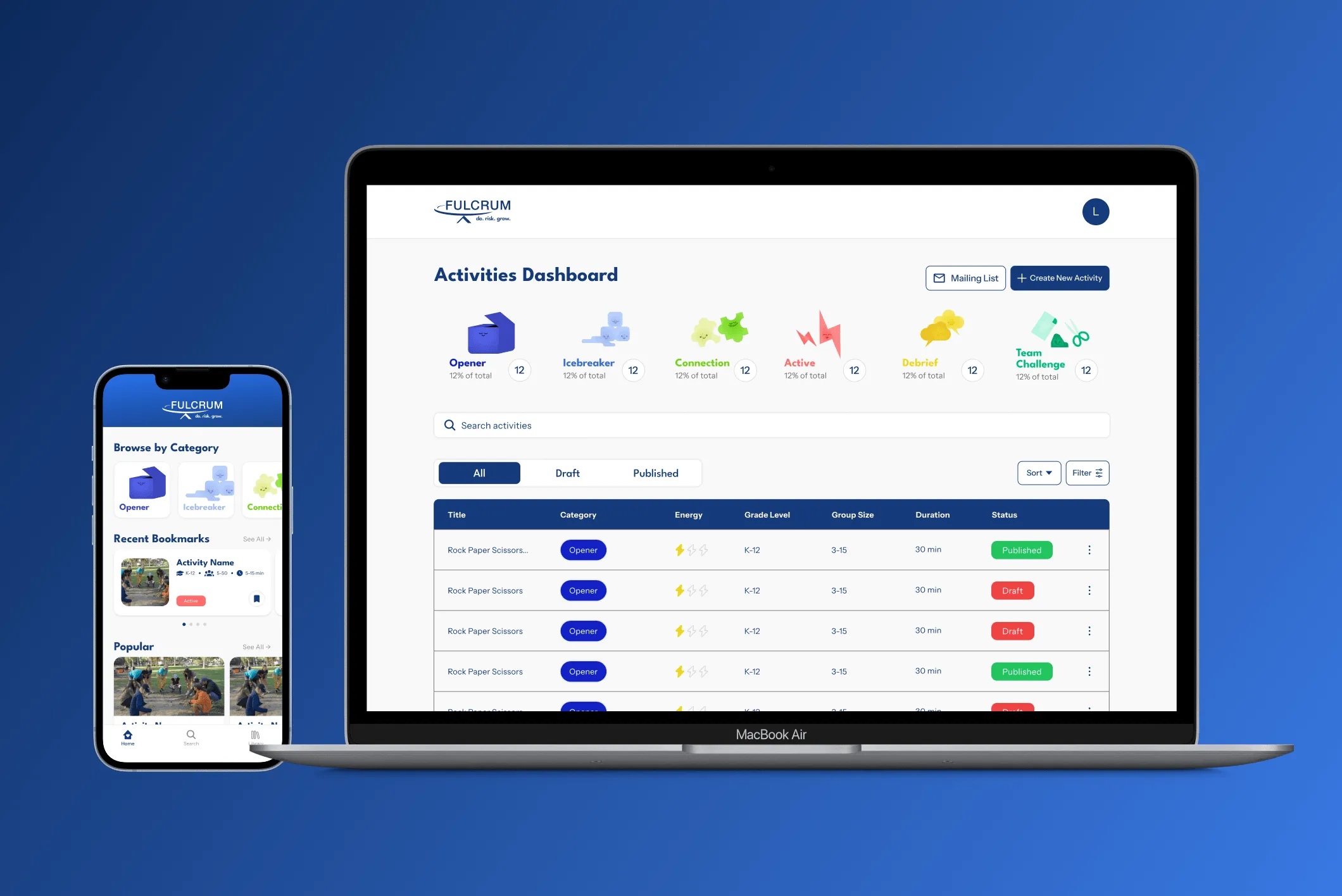
Mobile app
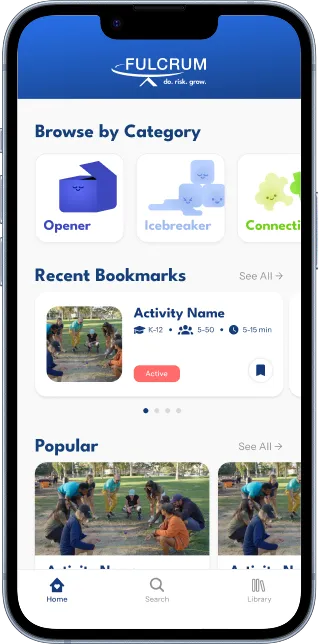
The app is the resource library that now houses everything Fulcrum had in packets and PDFs. It helps facilitators get to the right activity fast, and gives the information they need to see during sessions.
- Quick navigation to recent activities and curated suggestions on homepage
- Search and filter features based on activity characteristics and requirements
- Bookmark and playlist organizing features, in addition to offline downloads and history
- Activity page with embedded video tutorial, with extensive details and instructions organized in tabs
Admin dashboard
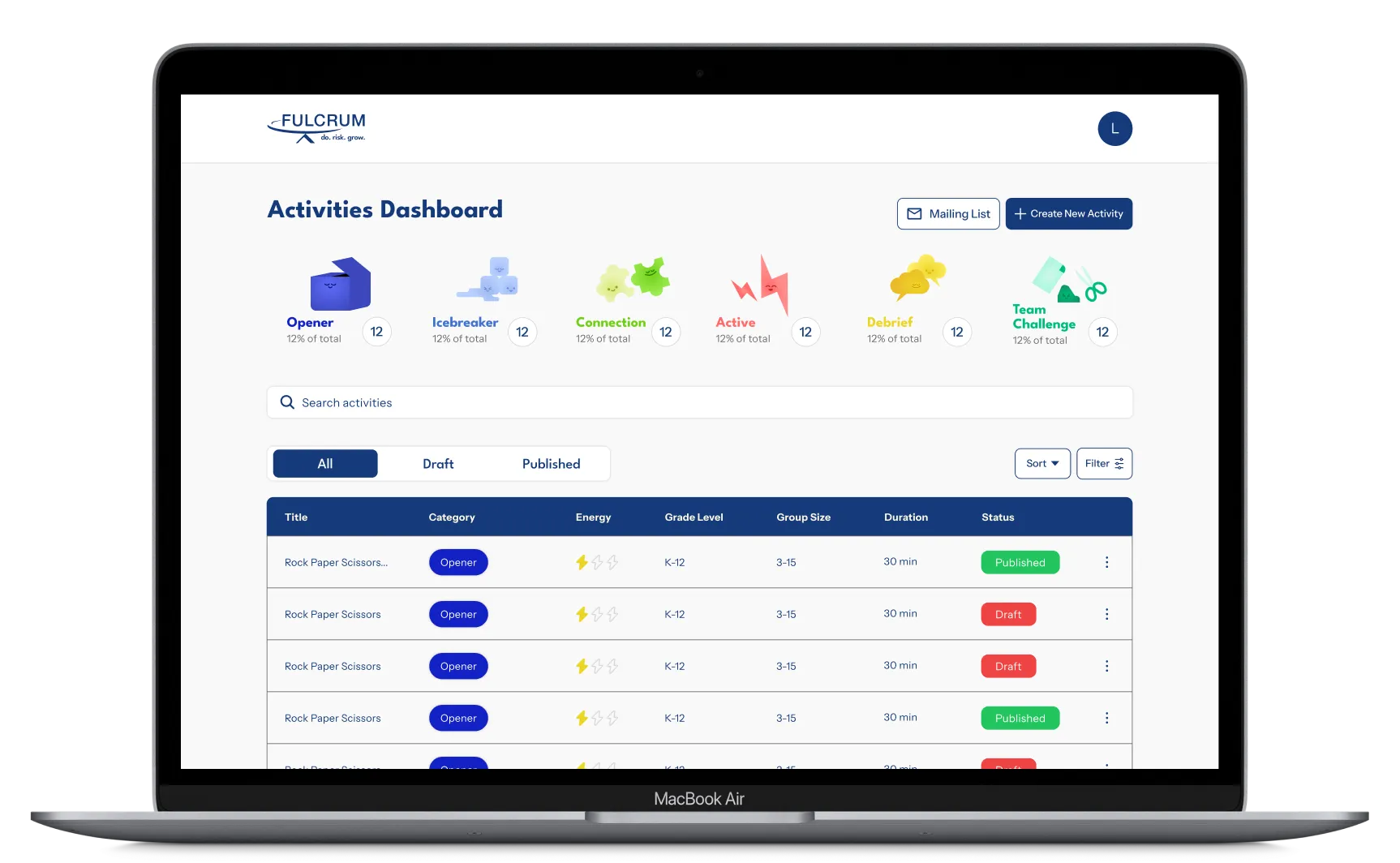
The admin dashboard helps Fulcrum staff work on activities in the editor page, whose content maps one-to-one to the structure of the activity page. It keeps all activities consistent, and makes it possible for Fulcrum to neatly scale the library.
- List view dashboard with features to sort, search, filter, and toggle based on activity status
- Adaptive media upload feature for creating activities, changes editing controls based on media type
- Realistic mockup preview of how the activity will look in the app as the last step before publishing
Design Process
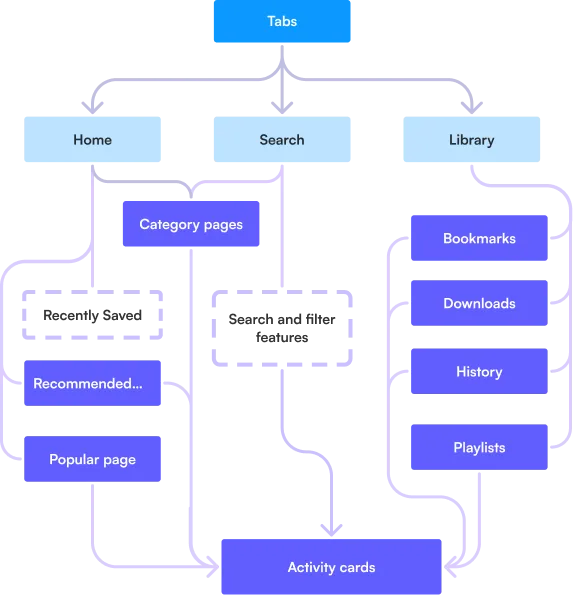
When building, we started with identifying the information architecture rather than flows because facilitators shouldn't be limited to one path. The app has four entry points and different user journeys, with the activity page as the final destination.
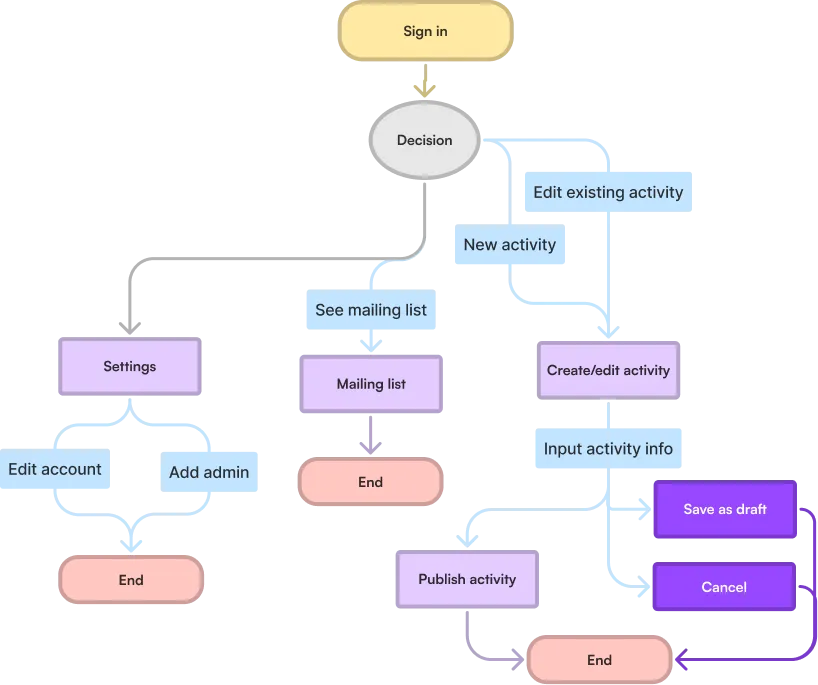
In contrast, the admin dashboard is more straightforward; its core purpose is efficient content management (creating, editing, saving drafts, and publishing). We started with mid-fidelity designs and refined the flows as we went.
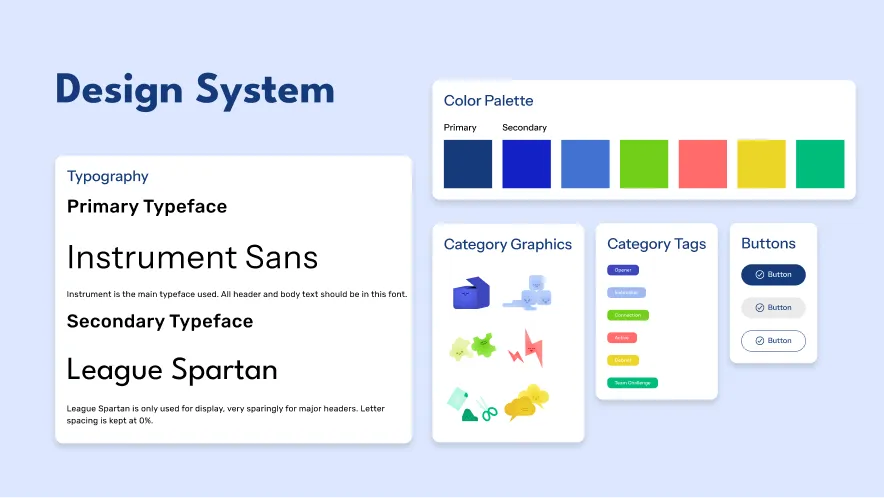
To make sure our work was consistent and scalable, we defined a system of design tokens and core components. We used them to build up feature-specific components and standardized content templates that allow Fulcrum staff to expand their library without visual and structural drift.
Iterations
What broke during testing?
After each handoff phase, we conducted user testing on our prototypes to identify areas of friction in both the MVP and V2 products. The feedback directly shaped several design changes like removing confusing features and clarifying terminology across the app.
The upload flow we discarded
Originally, the field for uploading media for activity covers in the admins’ desktop editor was meant to accept video and image formats. However, in the final development phase, the developers realized that storing large volumes of video files in the database wasn’t sustainable in the long run.
We decided to change the activity cover media system to use Youtube embeds instead of local video uploads. This meant reworking the entire interaction model around URL-based input instead of an adaptable file upload. The final iteration uses tab-separated entry fields to accomodate the new input method.
What does “Save” mean? What made an activity count as “completed”?
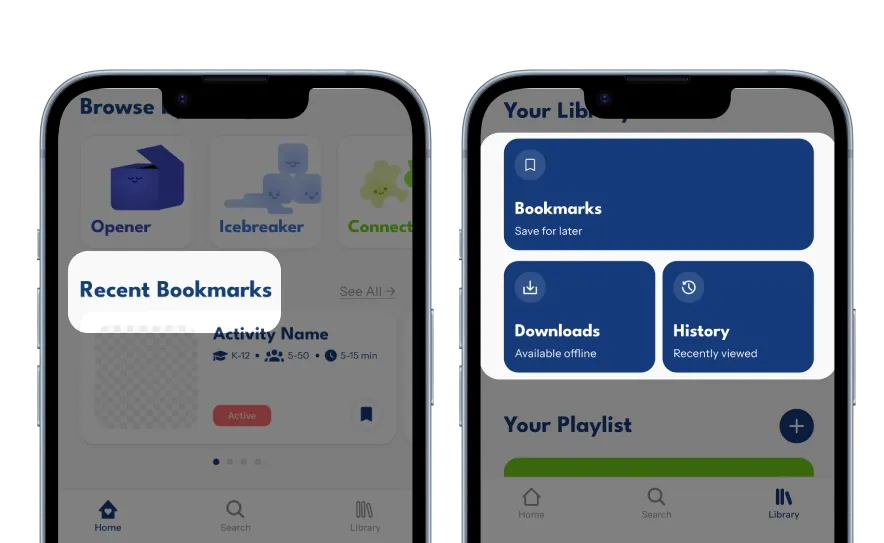
User testing revealed a discrepancy in our terminology for the saving feature. We used “Save” to refer to the action, but described the saved activities as “Bookmarked”. This caused confusion by making users think the two terms referred to different features. Users also questioned the relevance and meaning behind marking activities as completed.
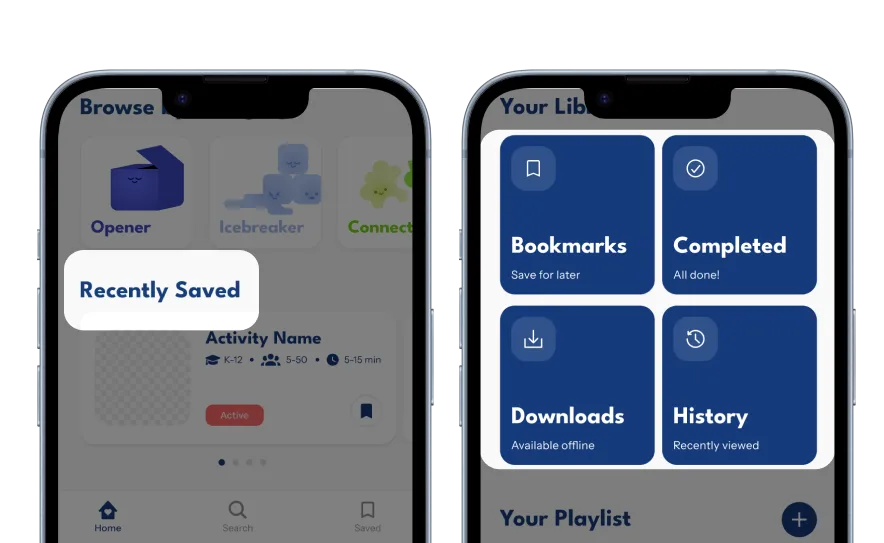
We reconciled the saving feature by consistently using the terminology “Bookmarked” and “Bookmarks” for the action and description. We also decided to remove the completed features, since after consideration it seemed unintuitive to label repeatable activities as “Completed”.
Reflection
Be ready to make sacrifices
Throughout our timeline, we saw many features being sacrificed because of timeline or feasibility constraints, even if the features were fully shipped. This taught me not to get too attached to designs, since a project's constraints and needs could always change.
Alignment prevents detours in progress
A few avoidable iterations were made during the process. In addition to the media flow redesign, there was an instance where the devs understood a foundation of the project differently, but the discrepancy wasn't discovered until the developer showed us the built-out feature. With more consistent alignment, these roadblocks could have been discovered earlier, which leaves more time for refinement tasks like quality assurance and user testing.