Context
Turning a design into a shipped product is never as clean as it looks. Gaps show up after handoff as edge cases that were never documented, stale Figma comments, context spread across Slack threads and meeting notes, and rationale that only exists in a designer’s memory. In the process of fixing uncaught issues, developers spend time hunting for answers instead of building, and well-designed products risk getting implemented inconsistently.
In Figma's 2025 Design Statistics report, 91% of developers and 92% of designers said handoff could be improved. Research on software team coordination (Cataldo et al., 2008) shows that when communication doesn't track the real dependencies between people and their work, delivery slows and defects increase. Handoff has this same dependency in a different format; developers follow decisions made earlier by designers. Misalignment is the easiest to fix at its source, while every step down the line increases the cost.
Why solve this inside Figma?
Figma reports 13 million monthly active users, two-thirds of them non-designers. This means developers and PMs are already in the file. Hewlett-Packard reported a 50% reduction in development time on some projects after rolling out Dev Mode with their internal design system, so platform-native handoff improvements have already been shown to pay off.
The opportunity is to take a workflow Figma already partially owns and fill in the gaps natively. This way the conversation about components and screens lives on the same elements, and misalignment gets caught at the source instead of a cycle later.
User Research
We interviewed different people across the handoff experience, including a UX designer at Oracle, a design intern at Apple, and an engineering lead at a student software org. We talked with each about how they communicate, what breaks during implementation, and how they manage context based on their real handoff experiences.
What we found
Handoff is more like an ongoing negotiation than a step. Designers ship Figma files, annotations, and prototypes. Developers treat them as loose references and fill in the gaps with assumptions rather than asking.
Communication is dispersed across Slack, meetings, and tickets, so context and decisions are hard to retrace. Developers need clarification on edge cases and interaction states, while designers have no way of tracking implementation progress. Teams compensate with workarounds like specs, extra prototypes, and DMs. These are all manual processes that take time and are still disconnected from where the work lives.
Competitive analysis
Figma Dev Mode
A developer-facing mode built directly into Figma that lets developers inspect designs, measurements, CSS values, and component details without needing full editor access.
Strength
Lives in the file designers already use, so nothing needs exporting. Surfaces tokens and CSS directly, so developers don’t translate specs by hand
Where it breaks
Built for inspection, not collaboration. Frames stay editable after they are marked ready, so devs can build from stale versions
Zeplin
Standalone platform built for handoff. Teams export designs from Figma into Zeplin, which organizes them into developer-friendly specs, annotations, and style guides.
Strength
Locked snapshots give devs a stable reference mid-build, and version diffs show exactly what changed. Specs are readable by PMs and QA too
Where it breaks
Designs have to be exported out of Figma, so they drift out of sync. Also is another subscription on top of one teams already pay for
Linear
PM and issue-tracking tool built specifically for software development teams. Developers use it to manage sprints, track bugs, assign tasks, and plan roadmaps.
Strength
Threads live on the task, so discussion stays searchable and tied to the work. Clear status states and GitHub links connect tasks to actual code
Where it breaks
Built by and for developers; designer adoption is low. Figma links attach to issues but designs are not inspectable inside it
Confluence
Atlassian’s team documentation platform. Product teams use this platform to store design spec information, PRDs, meeting notes, and general context.
Strength
Room for the long-form reasoning other tools can’t hold: rationale, edge cases, decision logs. Embedded Figma frames sit right next to the explanation
Where it breaks
Needs constant manual updating, and communication happens outside the platform
Takeaway
Each of these solves a real piece of handoff, but none keeps the design, the task, and the conversation in one place. Figma Dev Mode has the artifact but not the coordination, and Linear has the coordination but not the artifact.
Critical design context lives everywhere except on the design. Edge cases, rationale, and implementation details get spread across Figma comments, Slack, docs, and meetings, so cross-functional teams spend their time searching, re-sharing links, and re-explaining decisions instead of building.
Solution
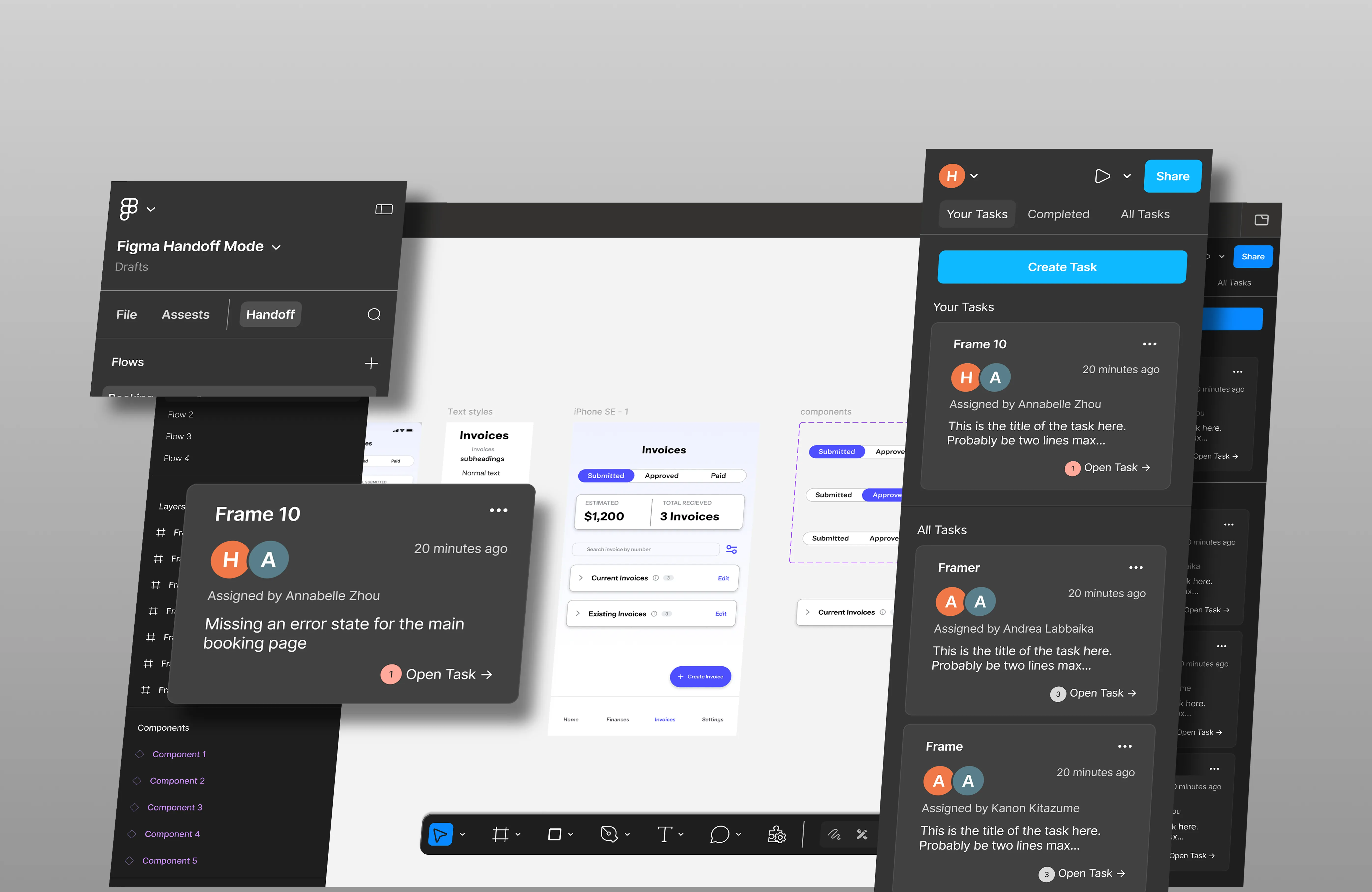
Figma Handoff Mode embeds the coordination layer into the file itself. Three main flows for creating tasks for frames, communicating in task threads, and tracking status make sure that active work stays in focus.
Creating tasks tied to frames
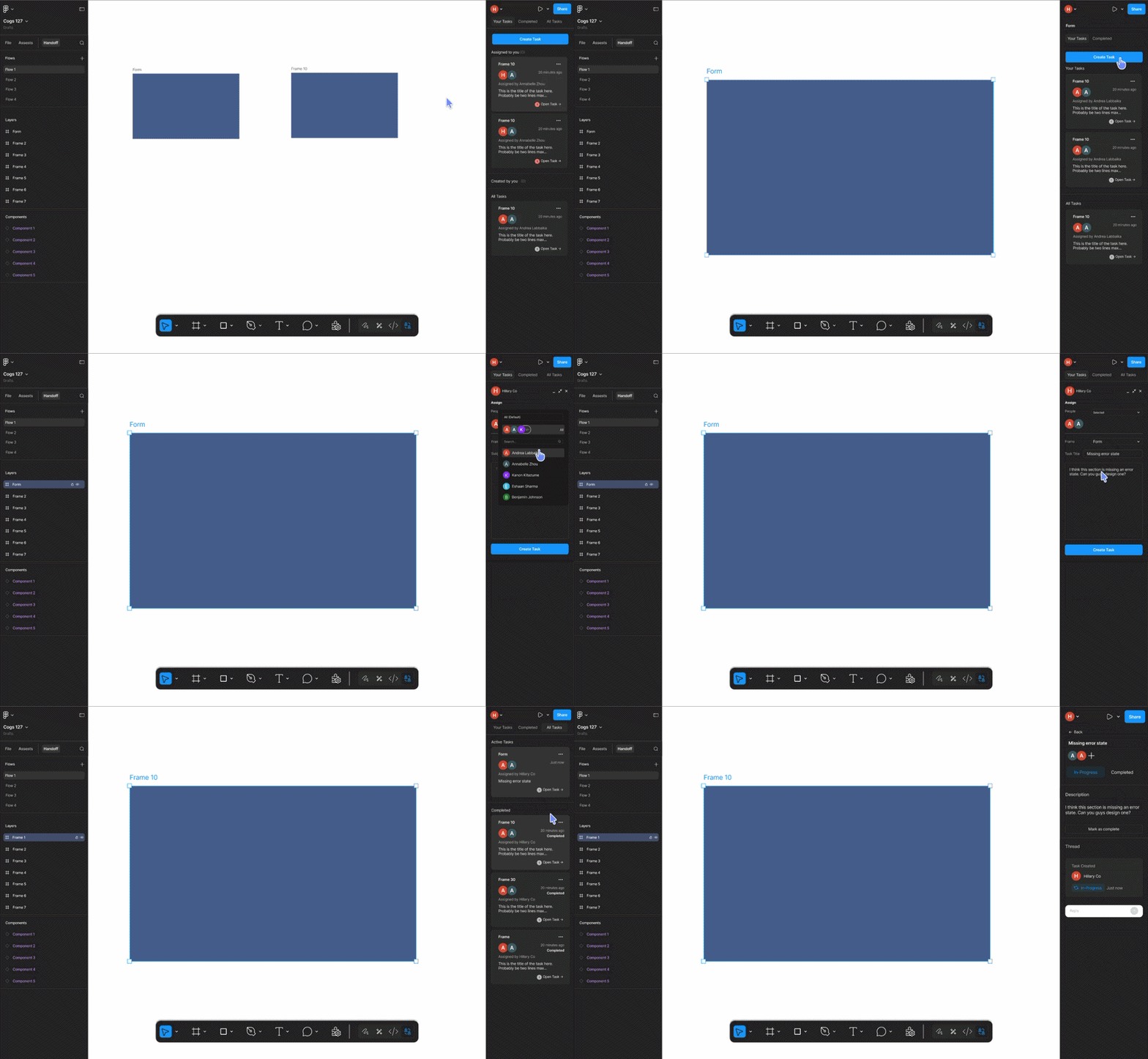
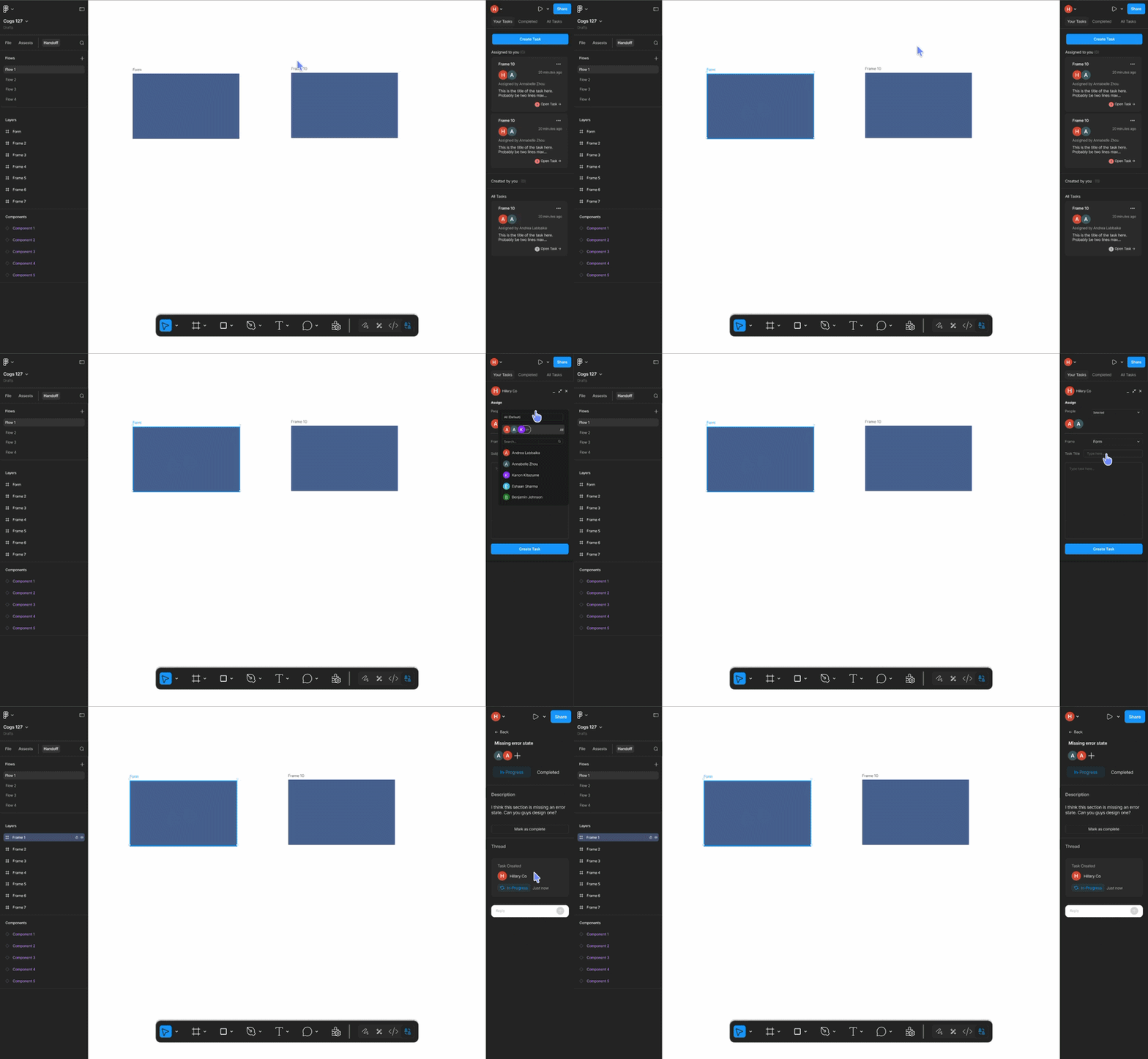
A team member can write a task and link it to a frame. Assignees jump straight to the design from the task, and the conversation stays attached to the thing it’s about. Tasks immediately surface in each assignee’s active queue.
Replying in thread
Opening a task shows its full content with a built-in thread. Either side can clarify requirements, flag issues, or confirm details without losing the design context that prompted the question.
Updating and tracking status
Resolved tasks move from Active to Completed, where they stay as a record. The Active queue stays clean, while both personal and project-wide completed lists let people audit and re-open what was resolved.
Iterations
Does the panel reduce handoff friction, or just move it?
We ran sessions with three designers and developers who'd shipped real client work, screen-sharing over Zoom so we could see where they hesitated instead of asking them afterward.
They understood ticketing and threads without explanation, but our design broke in two places.
People had trouble finding work meant for them
In the default state of the sidebar, the "People" list went unopened in every session, and testers couldn’t immediately tell which tasks were assigned to them. We removed the tab for people and re-populated the sidebar navigation with status tabs (Your Tasks, Completed, All Tasks). We also moved Create Task into the default view, since testers were searching for it before selecting a frame.
After testers noticed the task card felt cramped, we also gave it more room and improved the layout to better communicate who it was meant for and when it had updates to see.
Complexity that earned its place
We weren’t sure if the “click a frame to isolate its tasks” behavior justified its complexity, so we A/B tested it against a version without. Both testers preferred the richer version and neither found it disruptive. It provided value by answering the question, “which frame is this task about?”, so we kept it.
Reflection
Context belongs on the artifact
Disconnect is caused by documentation and artifacts living in separate places, not by bad documentation. We made tasks live on frames because that’s the place that both sides are always looking at.
Test before simplifying or setting decisions in stone
We guessed wrong in two directions. A “People” list made sense on paper but ended up being completely neglected. Frame filtering felt like excess complexity and turned out to be something that helped testers. Watching people work is what surfaced these two findings.